Agenie vs Looker Studio
Agenie is ecommerce decision intelligence that tells you what to do the day you connect your stack. Looker Studio is a free, blank canvas for building dashboards by hand. Here is the honest, side-by-side version.
No credit card required · Free for 30 days · See pricing
Agenie is a full data stack in one product: a managed warehouse, a governed semantic layer, the metrics framework, and Genie on top telling you what to do.
Looker Studio is the dashboard layer alone. You bring the data, build every chart, and read the result yourself.
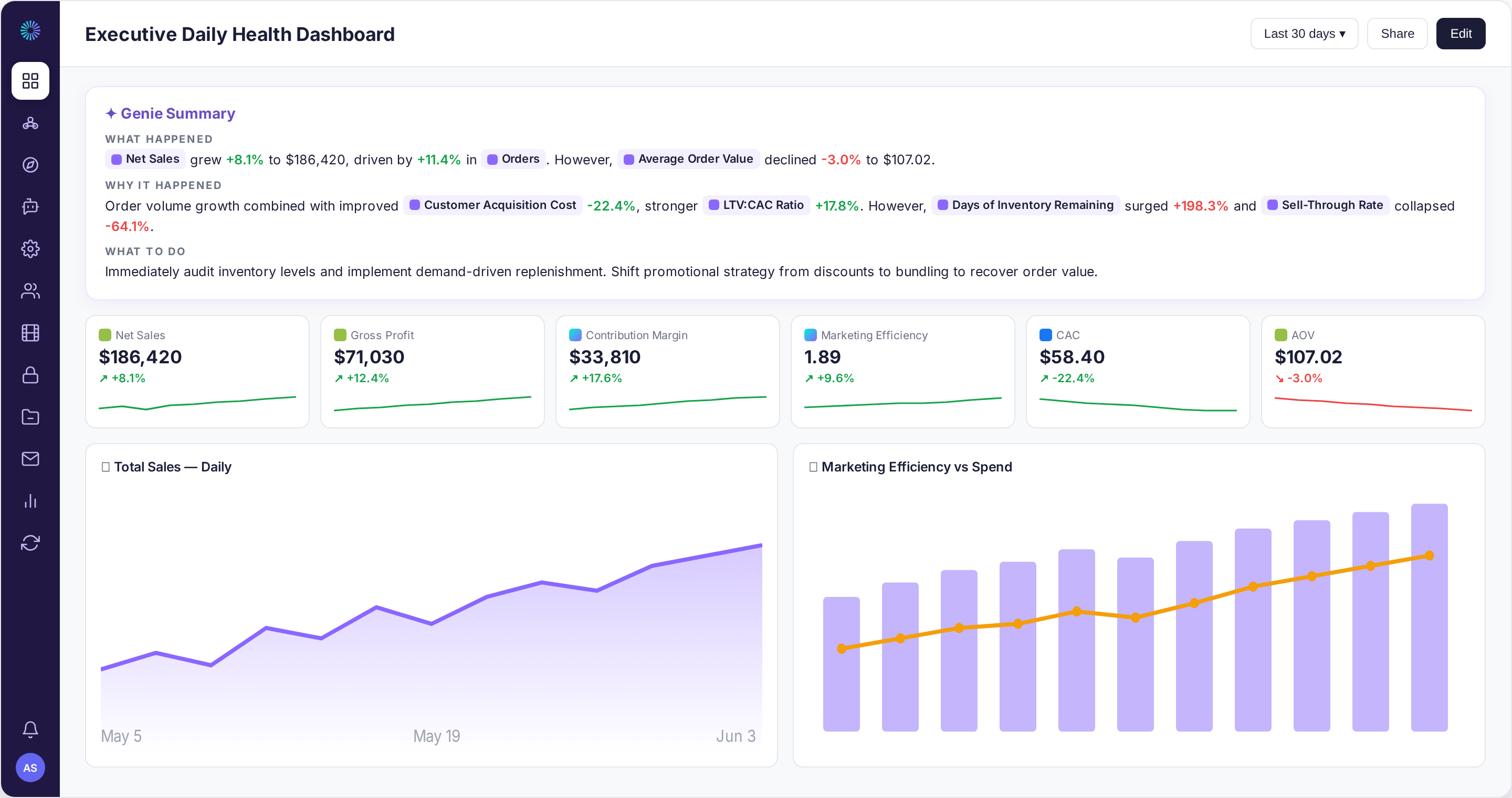
Built to run your whole business, not just your ad account.
Agenie does not just report your numbers. It diagnoses what is happening, helps you manage it, and proposes the fix, across every part of your business.
Every answer is built on the Metrics Map, a framework that gives each KPI a job, and tuned to your business with Genie Context, so the analysis fits how you actually operate, not a generic DTC template.
Agenie vs Looker Studio, side by side
| Agenie | Looker Studio | |
|---|---|---|
| Primary focus | Ecommerce decision intelligence, the answer in the product | A build-it-yourself dashboard tool |
| A managed data stack: pipelines, warehouse, semantic layer | Yes, all included | No, the dashboard layer only |
| Works the day you connect | ✓ | After you connect sources and build the reports |
| Pre-built ecommerce metrics | 300+ governed, out of the box | You define every metric by hand |
| One definition of MER, CM3, CAC everywhere | ✓ | No, each report can differ |
| Tells you what to do, not just what happened | ✓ | Charts you build and read |
| Proactive read of the business (Genie Summary) | ✓ | ✗ |
| Signals, Drivers, Outcomes causal framework | ✓ | ✗ |
| Right-click any metric for an in-product deep-dive (Ask Genie) | ✓ | ✗ |
| Blended cross-source KPIs (MER, CM3, blended CAC) | Built in | You build the blends by hand |
| Ecommerce and ad connectors | Core DTC stack, included | Google sources free; others via paid partner connectors |
| Fully custom dashboards across any data | Focused on DTC ecommerce | ✓ |
| Free to start | Free 30-day trial | ✓ |
| Time to value | Minutes | Hours for a chart, weeks to wire up reliable data |
Why you can act on what Genie shows you.
You act on these answers, so they have to be right, and they have to exist before you can read them.
Looker Studio is a blank canvas. It is free and flexible, but nothing about your business is modelled in it. You wire up the sources, often through paid third-party connectors, build every chart by hand, and define each metric yourself, with nothing stopping two reports from computing MER two different ways.
Agenie ships the model done: 300+ governed ecommerce metrics with one definition, a Signals, Drivers and Outcomes chain, and your Business Context. Genie reads it the day you connect.
Looker Studio gives you a canvas. Agenie gives you the answer.
Ecommerce semantic layer
300+ governed metrics with one definition everywhere. Genie cannot quietly invent a number or redefine MER mid-answer.
Signals, Drivers, Outcomes
Every metric sits in a causal chain. When an outcome moves, Genie checks the drivers, then the signals underneath. That diagnostic order is built in.
Your business context
Your CAC targets, margin guardrails and peak periods, set in plain language across company, team and each source. Genie reasons within your rules.
The difference, in practice
An illustrative example of the same week, read two ways.
Agenie tells you without the build: Meta ROAS down 12%, but blended CAC is flat and LTV:CAC is still healthy. It is creative fatigue, not a spend problem. Refresh the creative before you cut budget, and watch Add-to-Cart Rate as the early warning.
Looker Studio can show Meta ROAS down 12%, once you have connected the data, built the chart, and kept it from breaking.
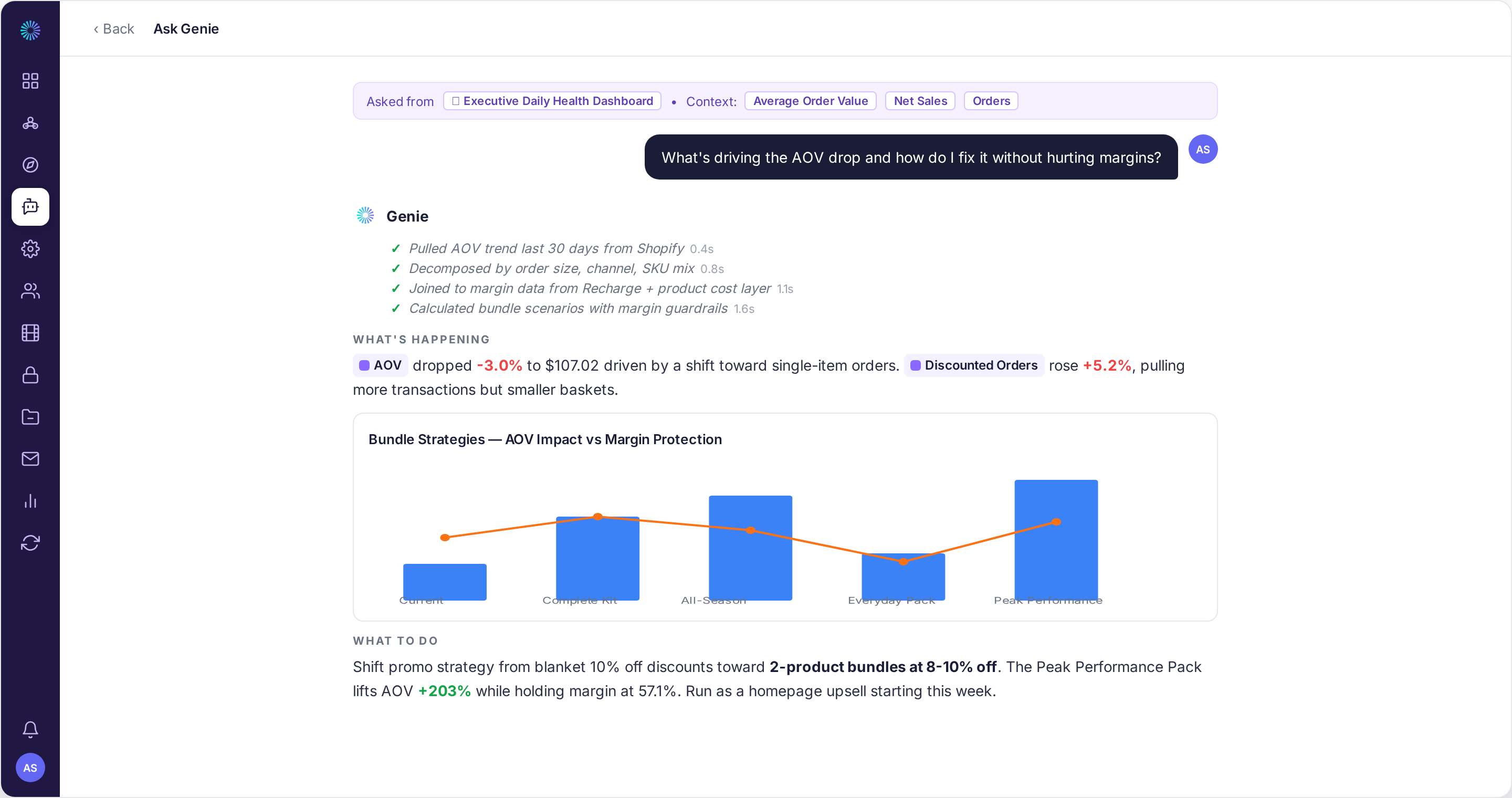
A full data stack, not a blank canvas.
Agenie is a complete data stack the day you connect: ingestion, a managed warehouse, 300+ governed metrics in a semantic layer, the Signals, Drivers and Outcomes framework, and Genie on top reading it all. Looker Studio is the dashboard layer alone. You connect the sources, often through paid partner connectors, build every chart, and define every metric yourself, with no warehouse, model or framework underneath unless you build that too. It is flexible, but it is a canvas, not an answer, and it is the small part of the stack that Agenie includes for free.
Decisions, not charts to read.
Looker Studio is a visualization tool: it draws whatever you wire into it, and the reading is yours to do. Agenie opens every board with a Genie Summary that has already diagnosed what moved, why, and what to do, across the whole business. One paints the chart. The other tells you what it means and where to act next.
Free is not the same as cheap, or done.
The tool is free, but ecommerce reporting in Looker Studio usually means paid third-party connectors and a lot of your time building and maintaining reports, and at the end you still have charts you have to interpret. Agenie is a few hundred a month, all in: connected, modelled, governed, and telling you what to do. Free costs you in connectors and hours. Agenie costs you a subscription and saves you both.
 Jacob Foy, Founder, Victory & Innsbruck
 “Instead of spending hours digging through reports, we can ask questions and quickly understand what is driving performance and where to focus.”
When Agenie is the clear choice
- You want answers about your store, not a dashboard to build and maintain.
- You do not want to wire up connectors and define every metric by hand.
- You want governed, consistent numbers, not reports that each compute MER differently.
- You want a proactive read and a recommendation, not a blank canvas.
When Looker Studio is the better choice
Looker Studio is a fine choice for some jobs:
- You want a free tool and have time to build and maintain the reports yourself.
- You need fully custom dashboards across any data, not just ecommerce.
- You already have a warehouse or clean connectors feeding data in.
- Your need is visualization, not diagnosis and a recommendation.
Free and build it yourself, or a few hundred a month, done
Connected, modelled and answering. No connectors to buy, no reports to build, Genie included.
The tool is free, but ecommerce data usually needs paid partner connectors (often four figures a year), and you build and maintain every report by hand, for charts you still have to read.
Looker Studio is free; Looker Studio Pro adds about $9 per user per month, and third-party connector costs vary. Agenie is published flat pricing (Starter £349, Growth £749), billed monthly.
Common questions
Is Looker Studio the same as Looker?
No, and the names cause real confusion. Looker Studio is the free Google dashboard tool (formerly Data Studio). Looker is the separate enterprise BI platform with LookML. This page is about Looker Studio, the one most DTC brands actually use.
Is Agenie a Looker Studio alternative?
For brands that want answers rather than a dashboard to build, yes. If you want a free, flexible canvas and are happy to build and maintain it yourself, Looker Studio is good at exactly that.
Isn’t Looker Studio free?
The tool is free, and Looker Studio Pro adds about $9 per user per month. But ecommerce reporting usually needs paid partner connectors and a lot of your time, and it only produces charts you still have to read. Agenie is pre-built and tells you what to do.
Will my numbers be consistent in Looker Studio?
Only if you enforce it by hand. Nothing stops two reports from defining MER or CAC differently. Agenie governs one definition of every metric everywhere, so the numbers reconcile by default.
Do I have to build everything in Looker Studio?
Yes. You connect the sources, build the charts, and define the metrics. Agenie ships it modelled, so the metrics and the read are there the day you connect.
See what moved, why,
and where to act next.
Connect your stack and get your first answers in minutes.
No credit card required · Or book a demo